Nidhi Dali
Home
Creating a scalable and efficient search flow for a high-volume document management system
Role - Sole UX researcher and UI/UX designer
Design Process - Double Diamond
Discover → Define → Design → Deliver
Industry - Insurance
Discover
Define
Design
Deliver
*
*
*
*
The Starting Point
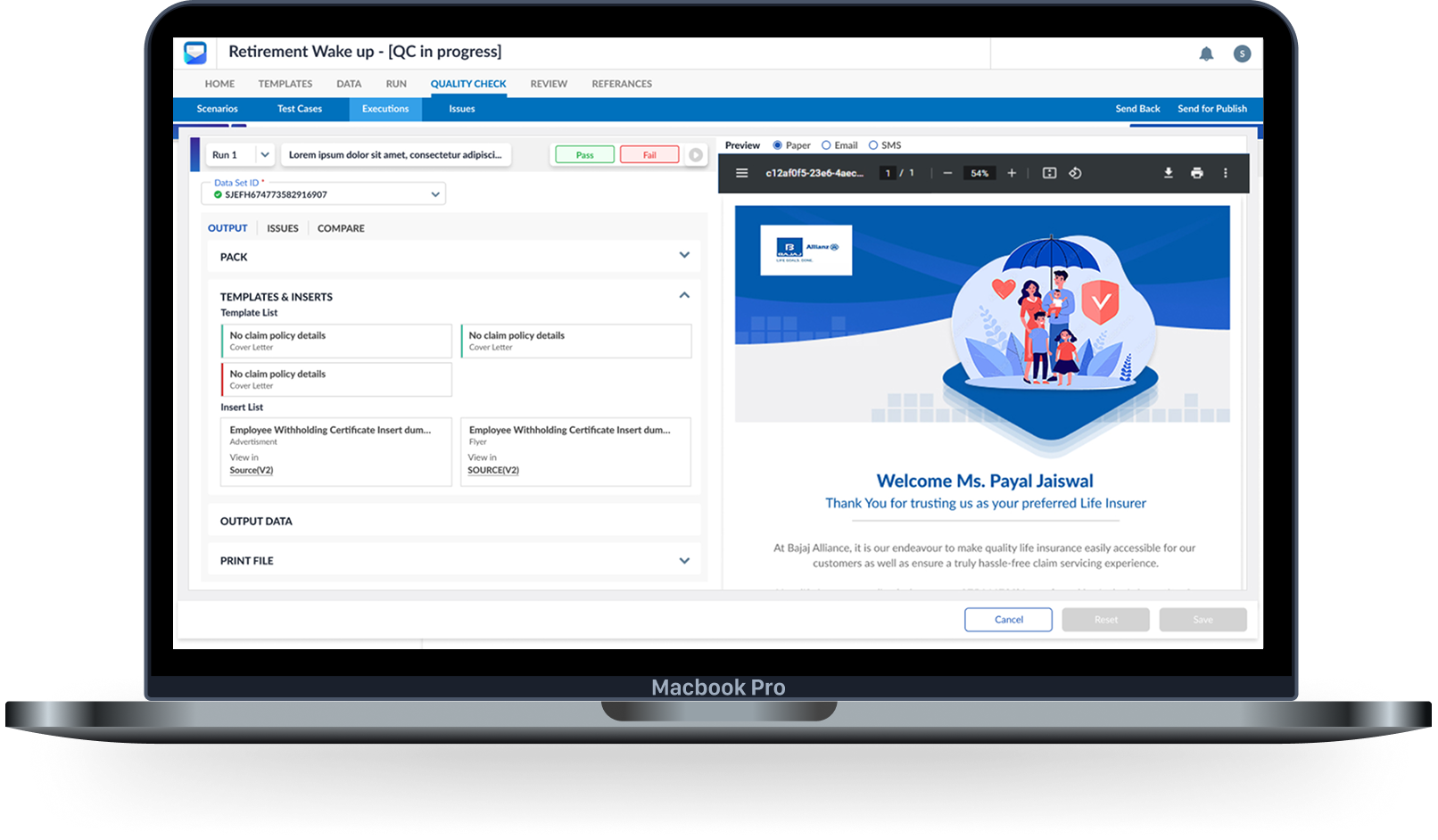
UCH Drive - a document management system, helps manage all user documents from start to finish. It can pull out useful information from files, organise them smartly, store them safely, and make them easy to search. It works with almost any type of file. There are also separate sections for admins and regular users to manage settings and search options.
Business Problem
In large-scale document management systems like UCH Drive, users often deal with hundreds of thousands of documents spread across multiple repositories. Navigating this vast volume of data without a structured search mechanism can lead to frustration, wasted time, and decreased productivity.
The leadership wanted to tackle this problem by introducing an intuitive search feature that helps users find documents easily.
Research Goal
To understand how users search for and retrieve documents within large-scale repositories, identify the challenges they face in locating specific documents.
To design an effective and scalable search experience, I conducted a competitor analysis to understand how leading document management systems and enterprise search tools solve similar challenges. This helped me identify industry best practices and discover gaps and opportunities.
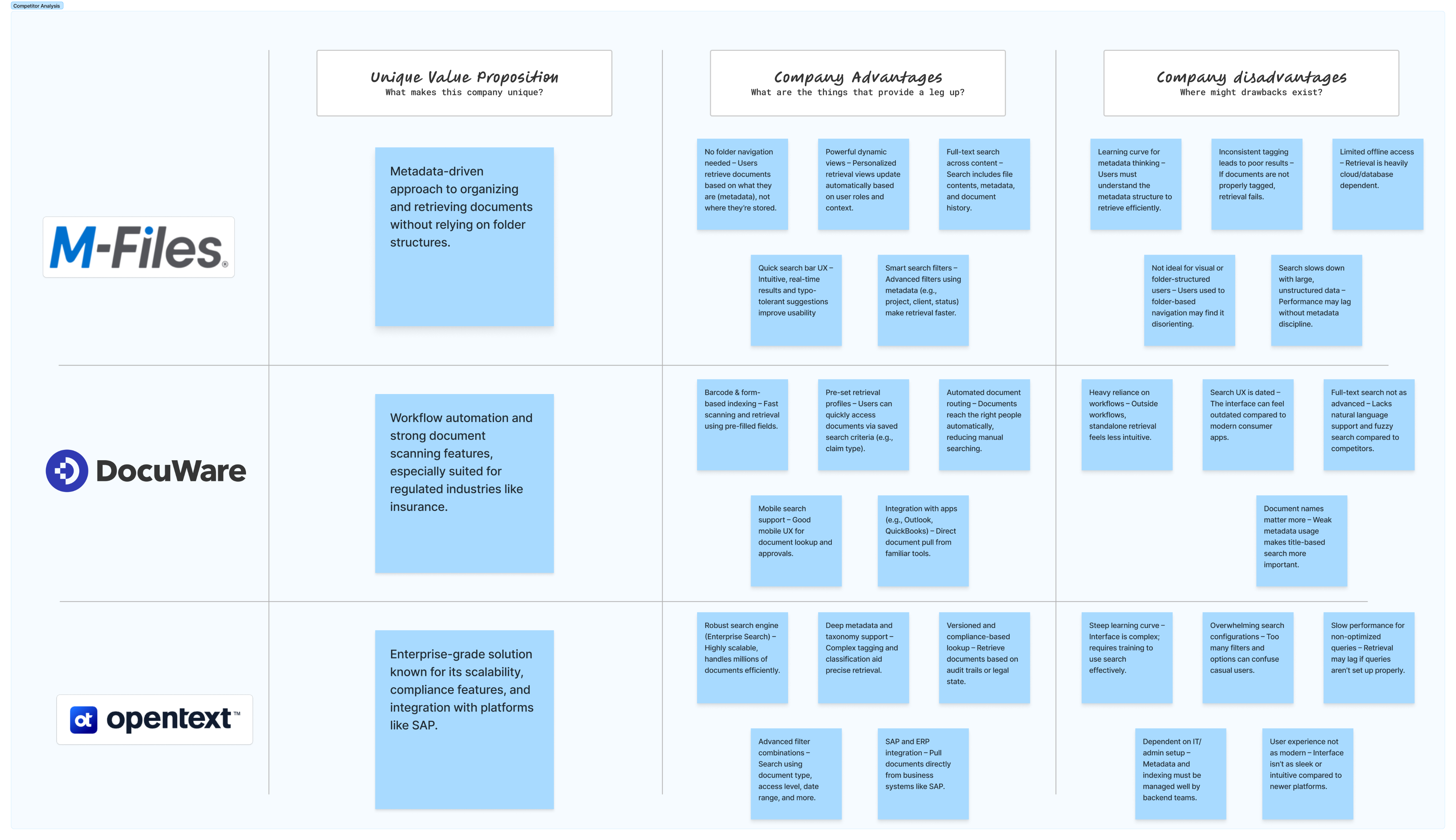
As I began researching Document Management Systems (DMS), I noticed that many tools like Notion and Trello appeared in search results, despite not being true DMS platforms. This was due to the trend of modern tools marketing themselves as all-in-one business solutions and leveraging strong SEO. To maintain focus, I narrowed my analysis to tools whose core functionality is document management. I selected M-Files, DocuWare, and OpenText Content Suite for their robust retrieval capabilities, metadata-driven organization, workflow automation, and enterprise-grade compliance — making them ideal benchmarks for document-centric UX evaluation.
- Metadata is a game-changer
M-Files’ metadata-driven retrieval offers a more dynamic and user-centric way to find documents, eliminating the need for traditional folder structures.
- Workflow integration enhances retrieval
DocuWare’s strength lies in combining document retrieval with automated workflows, making it effective in operational environments like insurance where documents follow defined processes.
- Enterprise-scale search comes at a cost
OpenText Content Suite provides robust, scalable retrieval for large organizations, but its complexity and steep learning curve can hinder usability for non-technical users.
- User experience varies widely
While all three tools offer strong retrieval features, the ease of use and intuitiveness differ significantly—M-Files is more user-friendly, whereas OpenText is more powerful but less approachable.
- Effective retrieval depends on implementation discipline
All platforms rely heavily on correct metadata tagging, indexing, and administrative setup; poor configuration can severely impact retrieval performance across the board.
Research Objective
- To explore how users currently search for documents (e.g., by name, ID, or metadata).
- To identify the limitations of existing search methods in high-volume environments.
- To evaluate user expectations around advanced filtering and repository-based search.
- To determine what metadata users find most useful when filtering search results.
Competitor Analysis
Key Takeaways
*
*
*
*
Discover
Define
Design
Deliver
Two core user search behaviours were identified in research, based on the competitor analysis :
- Some users know exactly what they’re looking for (e.g., a specific claim, invoice, or report) and prefer a quick search by Document ID. In industries like insurance, documents are often referenced by unique IDs (e.g., policy number, claim number). A direct Document ID search is the fastest retrieval method in such workflows.
- Others search more contextually, using metadata fields like document type, date, project/client, or workflow stage to locate what they need.
Designing for both behaviours would make the solution inclusive and efficient. Keeping this in mind I defined the following goal,
Goal
To simplify and accelerate document retrieval by providing users with flexible and efficient ways to search either through Document ID or context-specific metadata, tailored to repository selection.
How might we enable users to retrieve documents quickly and accurately using either a known Document ID or relevant metadata filters that adapt based on the selected repository?
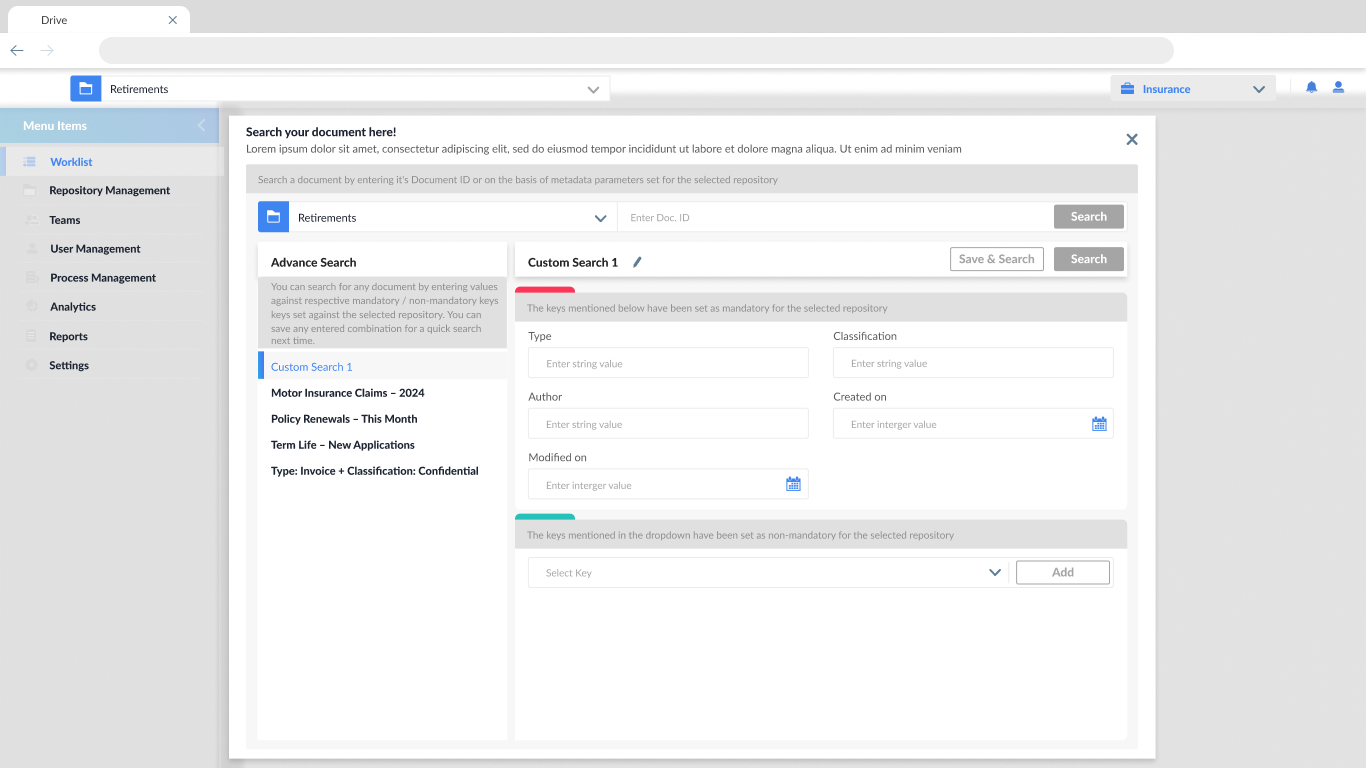
- Repository-specific metadata auto-loading
On selecting a repository, auto-load all mandatory and optional metadata fields defined for that repository.
- Dual search capability: Document ID or Metadata
Allow users to either input a Document ID for direct lookup or use the metadata fields for advanced filtering.
- Custom search templates (Save & Reuse)
Let users save metadata combinations as custom search presets (like “Custom Search 1” shown in your screen).
- Mandatory vs Optional metadata indicators
Visually distinguish required fields (red bar) from optional ones (green bar).
- Contextual helper text / tooltips
Add tooltips to explain what each metadata field means or why it’s required.
- Natural Language Search ------Next Release
Accept simple queries like “Find invoices from March 2024.”
- Keyword Highlighting in Results ------Next Release
Highlight matched keywords in the search result list.
Research Findings
- To explore how users currently search for documents (e.g., by name, ID, or metadata).
Users search for documents using a mix of file names, unique identifiers (like invoice or claim numbers), and metadata tags. M-Files emphasizes metadata-driven search over folder structures, while DocuWare relies on predefined search forms and document types. OpenText offers all options but often sees users defaulting to traditional navigation due to familiarity or complexity of the search setup.
- To identify the limitations of existing search methods in high-volume environments.
In environments with a large volume of documents, retrieval is often hindered by inconsistent tagging, slow performance, and rigid search interfaces. M-Files and OpenText suffer when metadata is poorly implemented, while DocuWare’s reliance on structured workflows limits flexibility. Across the board, the absence of intelligent or natural language search contributes to user frustration.
- To evaluate user expectations around advanced filtering and repository-based search.
Users expect faster, more intuitive filtering that adapts to their roles and tasks. M-Files meets this need through dynamic views, while DocuWare’s filters are fixed and tied to specific workflows. OpenText allows deep filtering but overwhelms users with complexity. The ability to save filters and search preferences is seen as a valuable feature in all platforms.
- To determine what metadata users find most useful when filtering search results.
The most helpful metadata fields across all tools include document type, date, client/project name, author, and document status. M-Files users benefit from contextual filters like purpose or workflow stage, DocuWare users prioritize transaction-related fields, and OpenText users rely on system-integrated metadata, especially in compliance-heavy use cases.
*
*
*
*
Discover
Define
Design
Deliver
Sketches
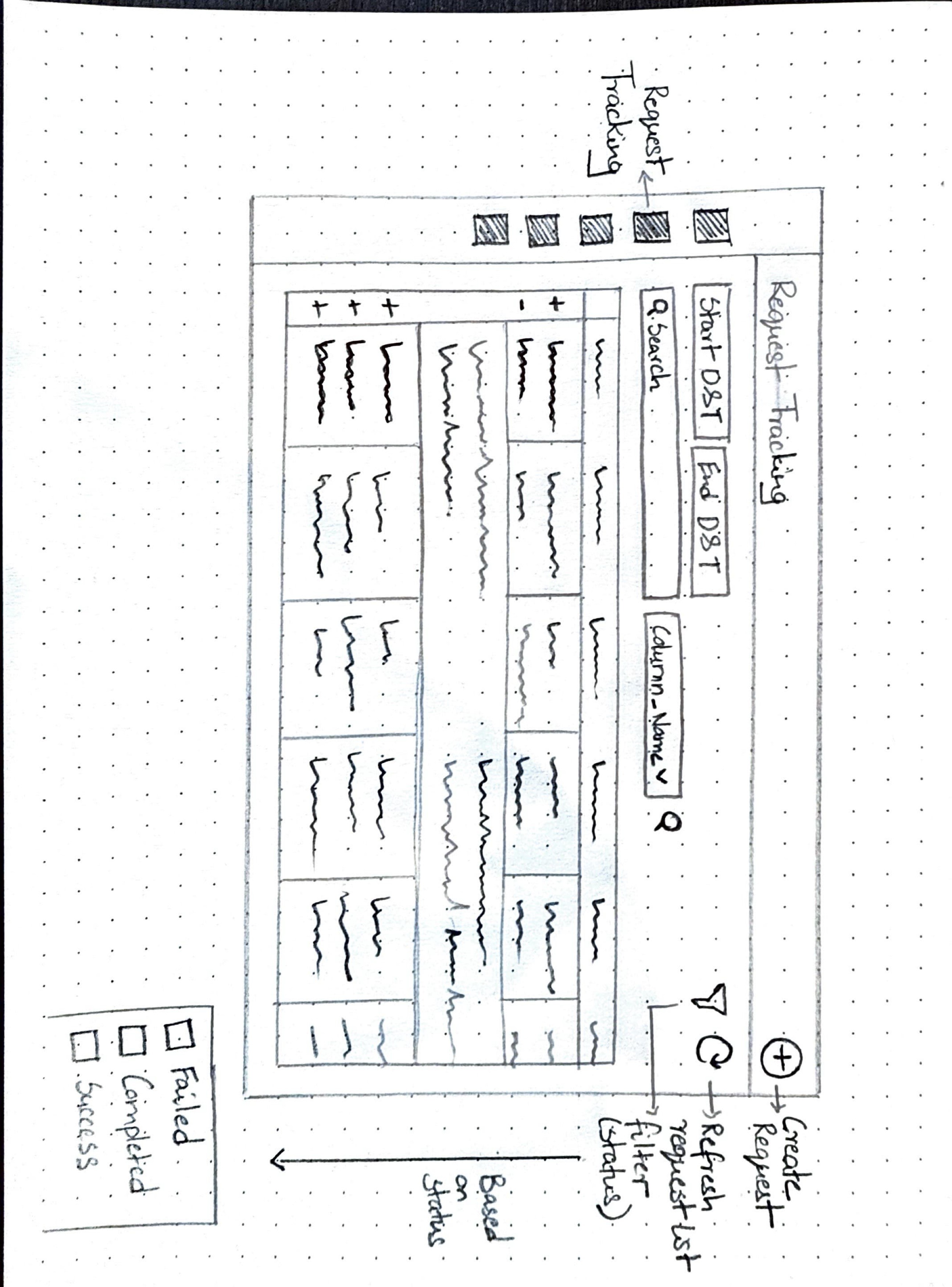
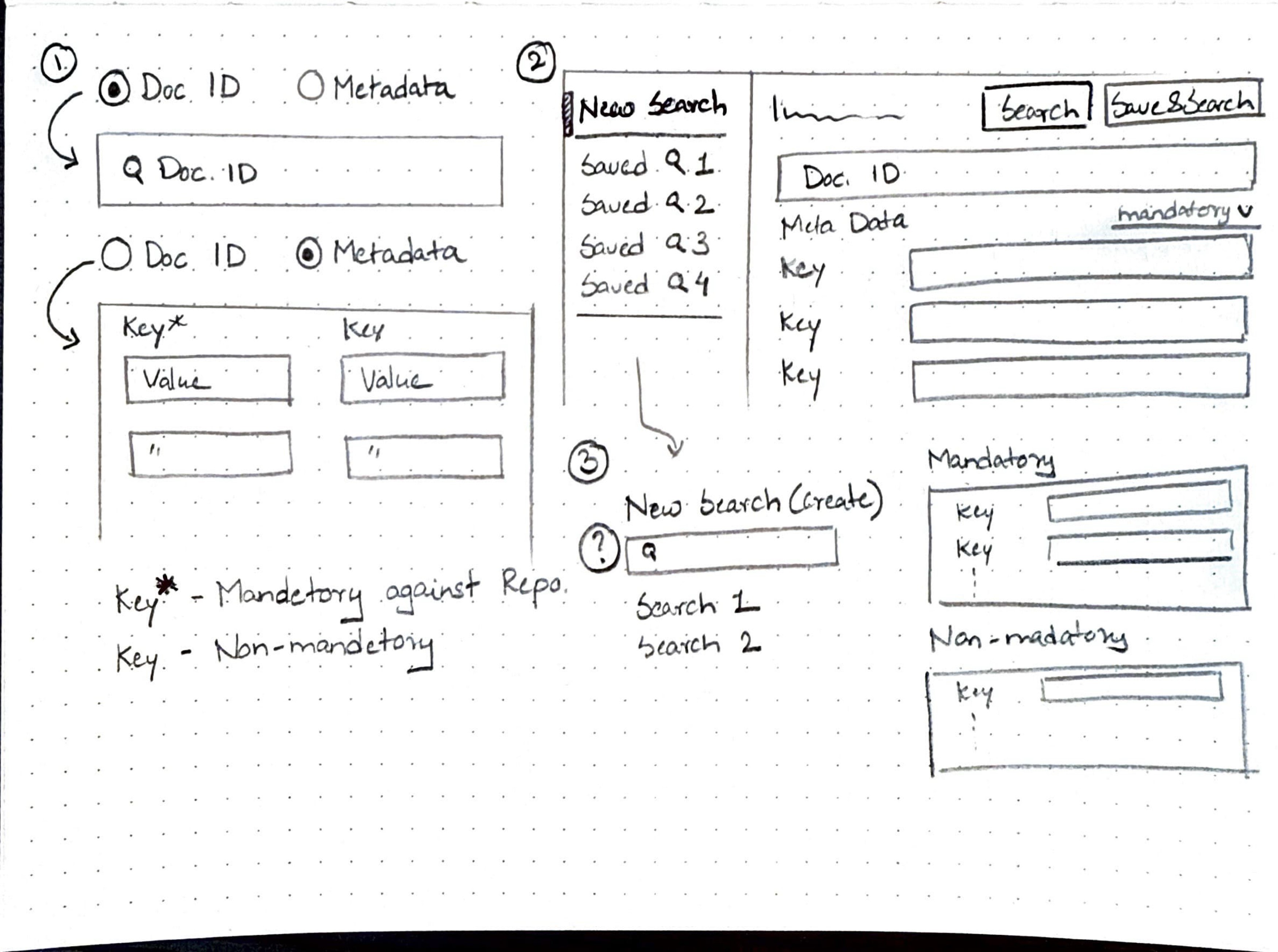
Before finalizing the design, I sketched out a few screen variations to explore how best to incorporate the key features outlined earlier.
I structured the search experience to clearly separate Document ID search from Metadata search, which is further divided into mandatory and non-mandatory keys. Initially, I considered a uniform layout, but after team feedback revealed that non-mandatory keys can be numerous, I opted for a different approach—fixed fields for mandatory keys and a user-selectable list for non-mandatory keys to avoid clutter.
Additionally, research showed that users often revisit previous metadata searches, so I introduced an option to save search parameters for future use. These choices led to a clean, user-friendly design with clear functional distinctions.
*
*
*
*
Discover
Define
Design
Deliver
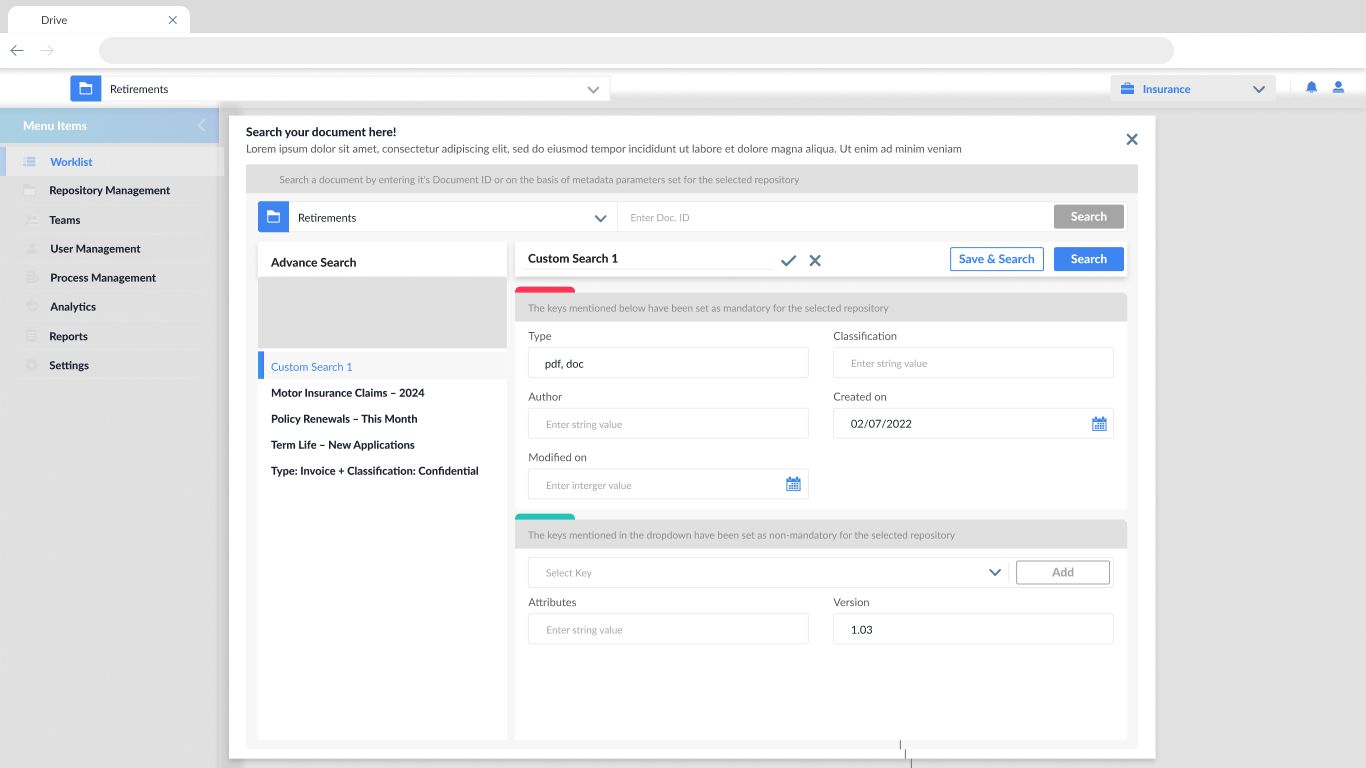
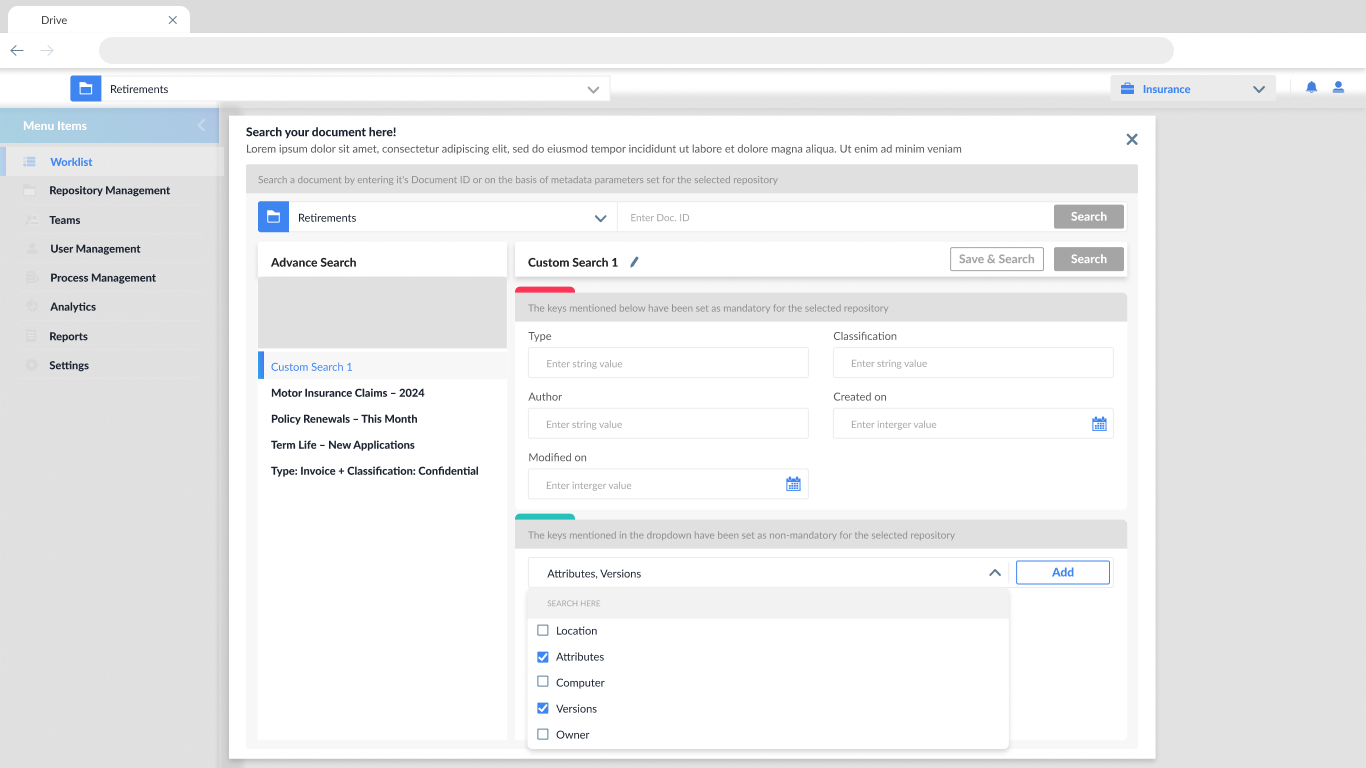
Search configuration panel
This enables users to create complex search via Document ID or using metadata fields (mandatory and optional), ensuring document retrieval is fast, relevant, and aligned with repository rules.
Dynamic field selection
Allows users to dynamically add non-mandatory metadata fields (like version, owner, or location), offering flexibility without overwhelming the UI.
Save & Retrieve Searches
Facilitates storing custom search queries for reuse, improving efficiency for users who frequently search using the same parameters.
Key Learnings
- I learned how to prioritize clarity while still enabling complex functionality. Designing for advanced users required offering customization (like dynamic field addition) without overwhelming the interface.
- Through research and iterations, I realized that accounting for non-obvious use cases (like partial metadata or uncommon search filters) early on reduces rework later and makes the product feel more robust.
Let’s work together
ux.with.nidhi@gmail.com
Phone Number
07769374695


